How to create UICollectionView with Custom Cell using Swift in iOS
https://ktrkathir.wordpress.com/2015/07/31/how-to-create-uicollectionview-with-custom-cell-using-swift-in-ios/


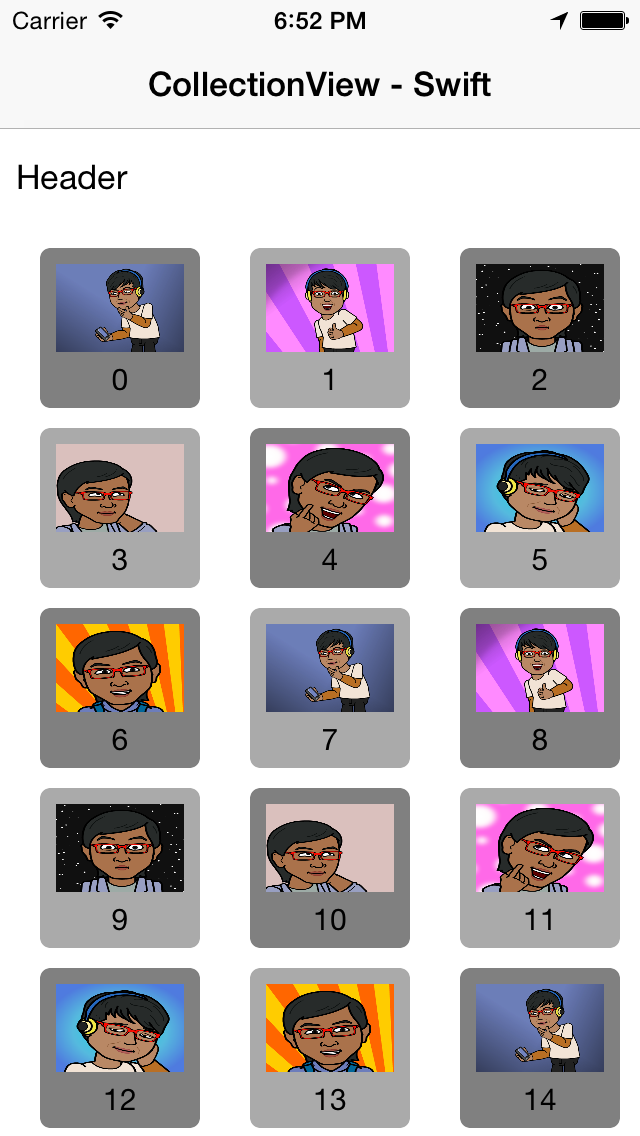
CollectionView using Custom Cell Screenshot 1

CollectionView using Custom Cell Screenshot 2
Set Delegate for UICollectionViewDelegate,UICollectionViewDataSource, UICollectionViewDelegateFlowLayout and Init the NSArray Value
import UIKit

class ViewController: UIViewController, UICollectionViewDelegate,UICollectionViewDataSource,UICollectionViewDelegateFlowLayout {

    var imageArr : NSArray!

    override func viewDidLoad() {
        super.viewDidLoad()
        // Do any additional setup after loading the view, typically from a nib.

       //set image name in this array
       imageArr = ["1","2","3","4","5","6","7","1","2","3","4","5","6","7","1","2","3","4","5","6","7","1","2","3","4","5","6","7","1","2","3","4","5","6","7"]
    }
Use UICollectionViewCell and Design in UIStoryBoard and set class name
class CollectionCell: UICollectionViewCell{

    @IBOutlet var imageView: UIImageView!
    @IBOutlet var title_Lbl: UILabel!
}

class CollectionHeader: UICollectionReusableView {
    @IBOutlet var headerTitleLbl: UILabel!

}

class CollectionFooter: UICollectionReusableView {
    @IBOutlet var footerTitleLbl: UILabel!

}
CollectionView Delegate
 //MARK: collectionView Delegate
    func collectionView(collectionView: UICollectionView, numberOfItemsInSection section: Int) -> Int {
        return imageArr.count
    }

    func collectionView(collectionView: UICollectionView, cellForItemAtIndexPath indexPath: NSIndexPath) -> UICollectionViewCell {

        var cell : CollectionCell=collectionView .dequeueReusableCellWithReuseIdentifier("CollectionCell", forIndexPath: indexPath) as! CollectionCell

        //cell.backgroundColor = UIColor.blueColor()
        cell.title_Lbl.text = "\(indexPath.row)";

        cell.imageView.image = UIImage(named:imageArr.objectAtIndex(indexPath.row) as! String )

        if (indexPath.row % 2 == 0){

            cell.backgroundColor = UIColor.grayColor();
        }else{
            cell.backgroundColor = UIColor.lightGrayColor();
        }

        return cell

    }
If you need to design a Header and Footer for CollectionView use this delegate
func collectionView(collectionView: UICollectionView, viewForSupplementaryElementOfKind kind: String, atIndexPath indexPath: NSIndexPath) -> UICollectionReusableView {

        switch kind {

        case UICollectionElementKindSectionHeader:

            var headerView:CollectionHeader = collectionView.dequeueReusableSupplementaryViewOfKind(kind, withReuseIdentifier: "CollectionHeader", forIndexPath: indexPath) as! CollectionHeader

          //  headerView.backgroundColor = UIColor.blueColor()
            headerView.headerTitleLbl.text = "Header"
            return headerView

        case UICollectionElementKindSectionFooter:
            var footerView:CollectionFooter = collectionView.dequeueReusableSupplementaryViewOfKind(kind, withReuseIdentifier: "CollectionFooter", forIndexPath: indexPath) as! CollectionFooter

          //  footerView.backgroundColor = UIColor.greenColor()
            footerView.footerTitleLbl.text = "Footer"
            return footerView

        default:

            assert(false, "Unexpected element kind")
        }
    }
Download source code here

Comments
Post a Comment